AI Fix Shot
Open closed eyes in any photo
The perfect shot, ruined by a blink? Upload it to Shootie and the AI opens the eyes naturally — the face, outfit, background and light stay exactly as they were.
- First photo free (preview)
- No sign-up to try
- Ready in 1–2 minutes
- Works in your browser, no app
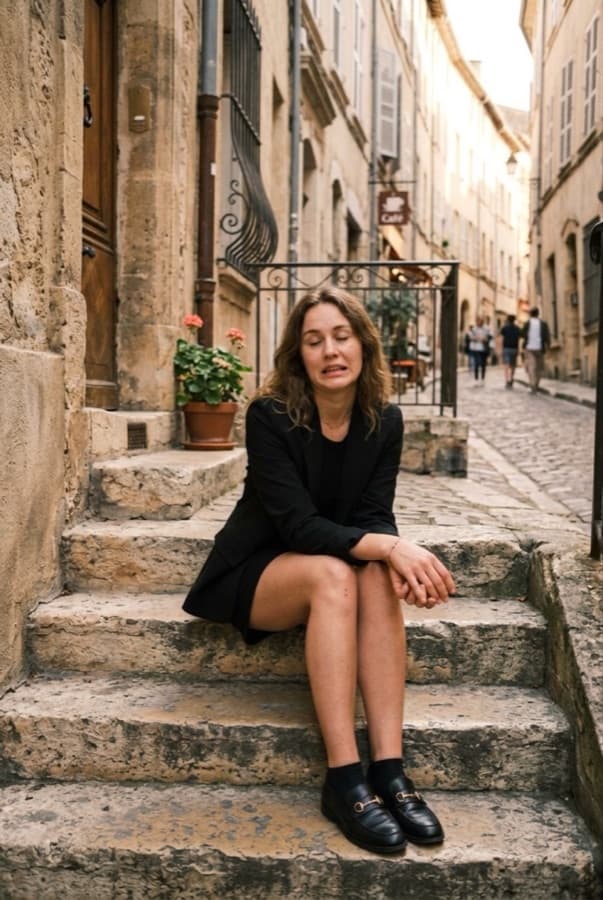
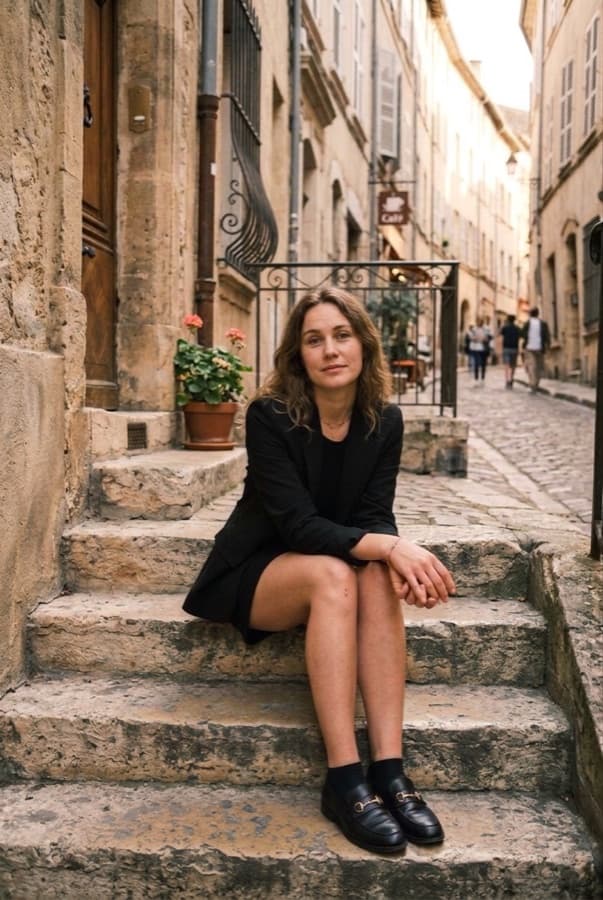
One tap, same moment
A real Fix Shot result: the photo on the left went in, the photo on the right came out.
What Fix Shot repairs
Pick “Auto” and the AI finds what looks off by itself — or choose exactly what to fix.
- Closed eyes and blinks — in portraits and group photos
- Half-closed, sleepy or squinting eyes
- Eyes looking away instead of at the camera
- A frozen mid-word mouth or an awkward grimace
- A tense face — or no smile where one belongs
- Slouching, a tilted head and stiff hands
How to open eyes in a photo
- 1
Upload the photo
Any photo from your phone or computer: a portrait, a selfie or a group shot.
- 2
Choose what to fix
Leave “Auto” or tap “Open eyes”, “Look at camera”, “Smile” and more.
- 3
Download the result
In about a minute you get the fixed photo and can compare it with the original.
Why it looks real
Fix Shot doesn't paste someone else's eyes on top — it redraws only what needs fixing.
The same person
Eye color, shape and the face itself stay the same — it looks like you, just with your eyes open.
Natural expression
No plastic smile or doll eyes: the result looks like a photo taken a split second later.
Group photos too
The fixes apply to everyone in the frame, so you don't have to retake the whole group.
Pose fixes
Straighten your posture, level your head and relax your hands in the same pass.
Everything else untouched
Clothes, background, light, colors and framing stay exactly as in the original.
Right in the browser
Works on iPhone, Android and desktop — no app to install, no Photoshop skills needed.
Questions and answers
Can AI really open closed eyes in a photo?
Yes. Shootie uses an image-editing AI model that redraws only the eyes and the expression around them, so the person still looks like themselves.
Is it free?
Your first fix is free, and you can try it without signing up. You see it as a smaller preview with a watermark — create a free account and any coin pack or subscription unlocks the full-size photo without it. After that, one fix costs 40 coins.
Do I need to sign up?
Not for your first photo — try it right away, no account needed. To keep the result and unlock the full-size photo, create a free account: Google in one tap or your email. No app to install and no card needed.
How do I fix closed eyes in a photo on iPhone or Android?
Open shootie.app in your phone's browser, upload the photo from your gallery and tap “Fix photo”. You can also add Shootie to your home screen like an app.
Will it change my face?
The AI is told to keep the face, age, skin, hair and makeup unchanged and not to “beautify” anything. If you don't like a result, tap “Again” for another take.
What else can it fix besides eyes?
A missing smile, an awkward expression, a gaze away from the camera, slouching, a tilted head and stiff hands. You can also describe your own fix in a few words.
Save the shot instead of deleting it
Upload a photo with closed eyes — the fixed version will be ready in about a minute.
Open eyes in my photo